requirements: web applications that is hosted in a docker containers from google cloud platform (GCP) platform. the goal is to put a human check in front of web applications without asking the developers (challenge authors) to implement captcha in their app.
one of the pros of cloudflare vs Cloud DNS (GCP) is that cloudflare can be a reverse proxy on top of an authoritative DNS which cloud dns is. because of this, cloud dns cannot rate limit web traffic by itself meanwhile, with cloudflare, you can apply waf rules, rate limits, etc.
the cons with cloudflare is cloudflare’s proxy only supports certain http/https ports by defautl.
captcha is a layer7 thing that sees endpoints, headers, cookies, user-agent, rate patterns, meanwhile gcp firewall on the network layer cannot see the URLs, the headers, http behavior, only the source IP, destination port.
is cloudflare firewall rule be redundant to gcp VM firewall rule?
public → cloudflare → gcp firewall → VM
the gcp firewall should allow only cloudflare IP
this is what cloudflare
**biggest downsides: no support for ports ** https://developers.cloudflare.com/fundamentals/reference/network-ports/#network-ports-compatible-with-cloudflares-proxy:~:text=HTTPS%20ports%20supported%20by%20Cloudflare
setting up infra poc
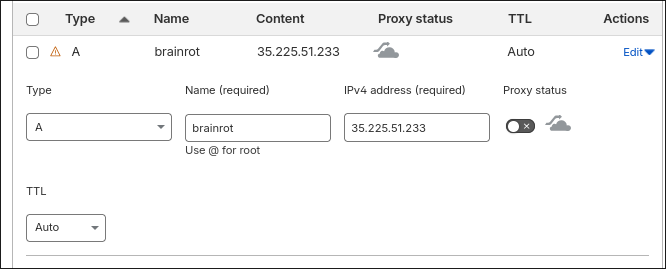
after adding domain umasscybersec.site and add subdomain zones, changed nameservers at the registra (namecheap) for clouflare to be authoritative for the whole zone, i.e. primary dns provider for the whole zone
continue to create a waf custom rule for the hostname with managed challenge
if we want to rate limit challenges?
https://nexterwp.com/blog/cloudflare-turnstile-vs-google-recaptcha/
https://www.reddit.com/r/cybersecurity/comments/pnivi1/bot_is_able_to_bypass_captcha_what_are_other/
edge cases for firewall rules
for netcat connection challenges: turn off proxy in cloudflare dns record setup. And there is no nginx set up for this type of challenge. because the VM instances listen on all ports, we can access this port.
turnstille
sitekey: public key used to invoke the turnstille widget on the site secret key: private key used for server-side token validation configurations: mode, hostnames, appearance settings, other settings
client-side:
- implicit rendering
- explicit rendering
server-side
- embed the turnstile widget in the page using sitekey
- cloudflare’s client side challenge script runs in the browser and produces a token if the interaction passes. but the server must still verify it.
- browser sends that token to backend
- backend sends token + secret key to cloudflare’s siteverify endpoint
- cloudflare replies whether the token is valid
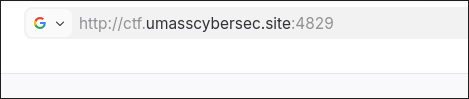 (note: even with gcp firewall allows all ports, the web is inaccessible since cloudflare rule doesn’t allow yet)
cons
have to add every subdomain dns record for each challenge
reload nginx every time you add a new challenge
dkms
dynamic kernel module support: linux framework that enables automatic recompilation of kernel modules (drivers) when upgrading to a new kernel version. ensures that out-of-tree moduels continue to function wihtout manual reinstatllation after system updates.
what is certbot?
docker run -it --rm --name certbot \
            -v "/etc/letsencrypt:/etc/letsencrypt" \
            -v "/var/lib/letsencrypt:/var/lib/letsencrypt" \
            -p 80:80 -p 443:443 certbot/certbot certonly
docker
force rebuild without cache docker build --no-cache -t <image-name>:<tag> .
rollback script
# Add Docker's official GPG key:
sudo apt update
sudo apt install ca-certificates curl
sudo install -m 0755 -d /etc/apt/keyrings
sudo curl -fsSL https://download.docker.com/linux/debian/gpg -o /etc/apt/keyrings/docker.asc
sudo chmod a+r /etc/apt/keyrings/docker.asc

# Add the repository to Apt sources:
sudo tee /etc/apt/sources.list.d/docker.sources <<EOF
Types: deb
URIs: https://download.docker.com/linux/debian
Suites: $(. /etc/os-release && echo "$VERSION_CODENAME")
Components: stable
Signed-By: /etc/apt/keyrings/docker.asc
EOF

sudo apt update

sudo apt install docker-ce docker-ce-cli containerd.io docker-buildx-plugin docker-compose-plugin -y

mkdir -p ~/docker-nginx
touch ~/docker-nginx/nginx.conf

echo "" > ~/docker-nginx/nginx.conf

docker run --name custom-nginx -p 80:80 -d -v ~/docker-nginx/html:/usr/share/nginx/html -v ~/docker-nginx/conf.d:/etc/nginx/conf.d:ro nginx
every time we modify the nginx.conf file, we don’t have to restart the nginx container, but needs to reload ngnix
docker exec custom-nginx nginx -s reloadthe nginx container also serves the html page that renders the turnstile widget. it is hte captcha page that sits at /_captcha/
and the backend uses fastapi to verify at /_captcha_verify (receives cf-turnstile-response, calls cloudflare siteverify with the token + secret)
a container for backend verification of cloudl
we need shared captcha file
if we set cookie cf_pass=1 to scope of .umasscybersec.site, one successful solve works on multiple subdomains meaning once you tested successfully once, the browser keep the cookie.
if the cookie was set with Doamin=.umasscybersec.site, then solving once on one subdomain bypass captcha on all of the subdomains